Read Thai Script: Typing on a Thai Keyboard in Thailand
Read Thai script right off a Thai keyboard: where consonants, vowels, tone marks and Thai numerals sit on the Kedmanee layout, with real photos from Thailand.
A Thai keyboard is the cheapest reading lesson in Thailand. Roughly seventy characters are packed onto forty-seven keys, and once you know how they are stacked, the script shrinks: the letters stop being an undifferentiated wall of curls and become a short list of fixed addresses under your fingers. If you are trying to read Thai script rather than admire it, spending an afternoon with a keyboard will teach you more about how the writing system is organised than a week of charts.
This Thai language guide walks across a real Thai keyboard — row by row, Shift layer included — and explains what each group of keys is for. Every character comes with its Thai form, a Thai transliteration you can say aloud, and its name, because the names are how Thai people spell things out to each other. By the end you should be able to read Thai script off a key face as readily as off a street sign. The four photographs are real keyboards and one real museum typewriter; everything described below is visible in them if you look closely.
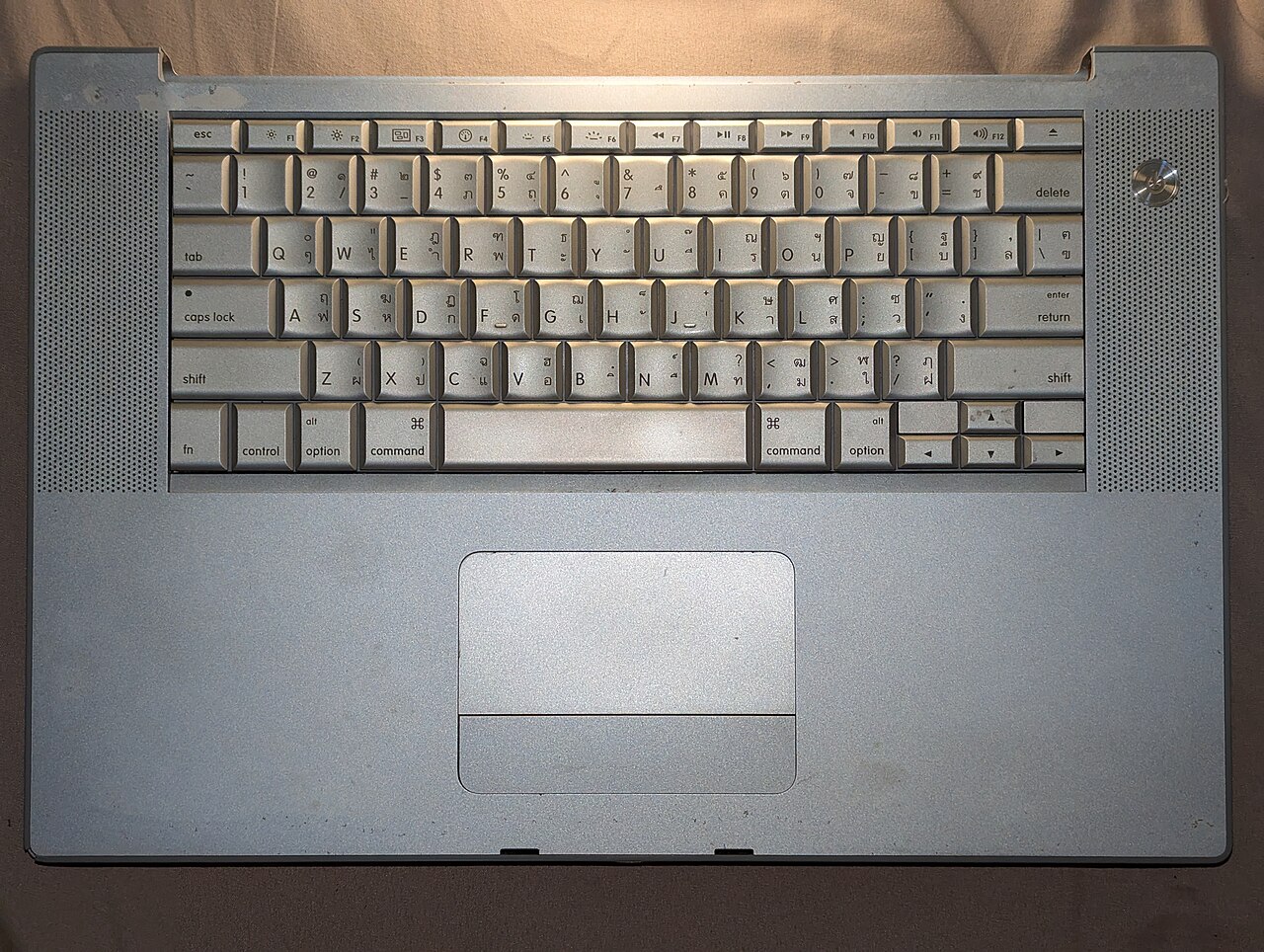
Thai has no capital letters, so Shift is a second alphabet
This is the single idea that makes the layout make sense. English needs Shift for capitals; Thai has no upper and lower case at all, so the entire Shift layer is free for more characters. That is how Thai consonants and vowels — all forty-four consonants, more than twenty vowel symbols, four tone marks, ten Thai numerals and a handful of punctuation marks — fit on a keyboard built for twenty-six letters.
- Unshifted keys carry the characters Thai uses most: the common consonants, the short vowels, and the two everyday tone marks.
- Shifted keys carry the rarer consonants — ฎ ฏ ฐ ฑ ฒ ณ ฌ ฆ ษ ศ ฬ ฮ — plus the Thai numerals and the two uncommon tone marks.
- Nothing is hidden behind a third layer. If a character is not on the key face, it is not on the keyboard.
The layout was built around that frequency logic deliberately. Its designers claimed that more than half of the most-struck keys sit on the home row and that fewer than one keystroke in ten needs Shift — which is exactly why the letters you meet first as a beginner are the ones sitting under your resting fingers.
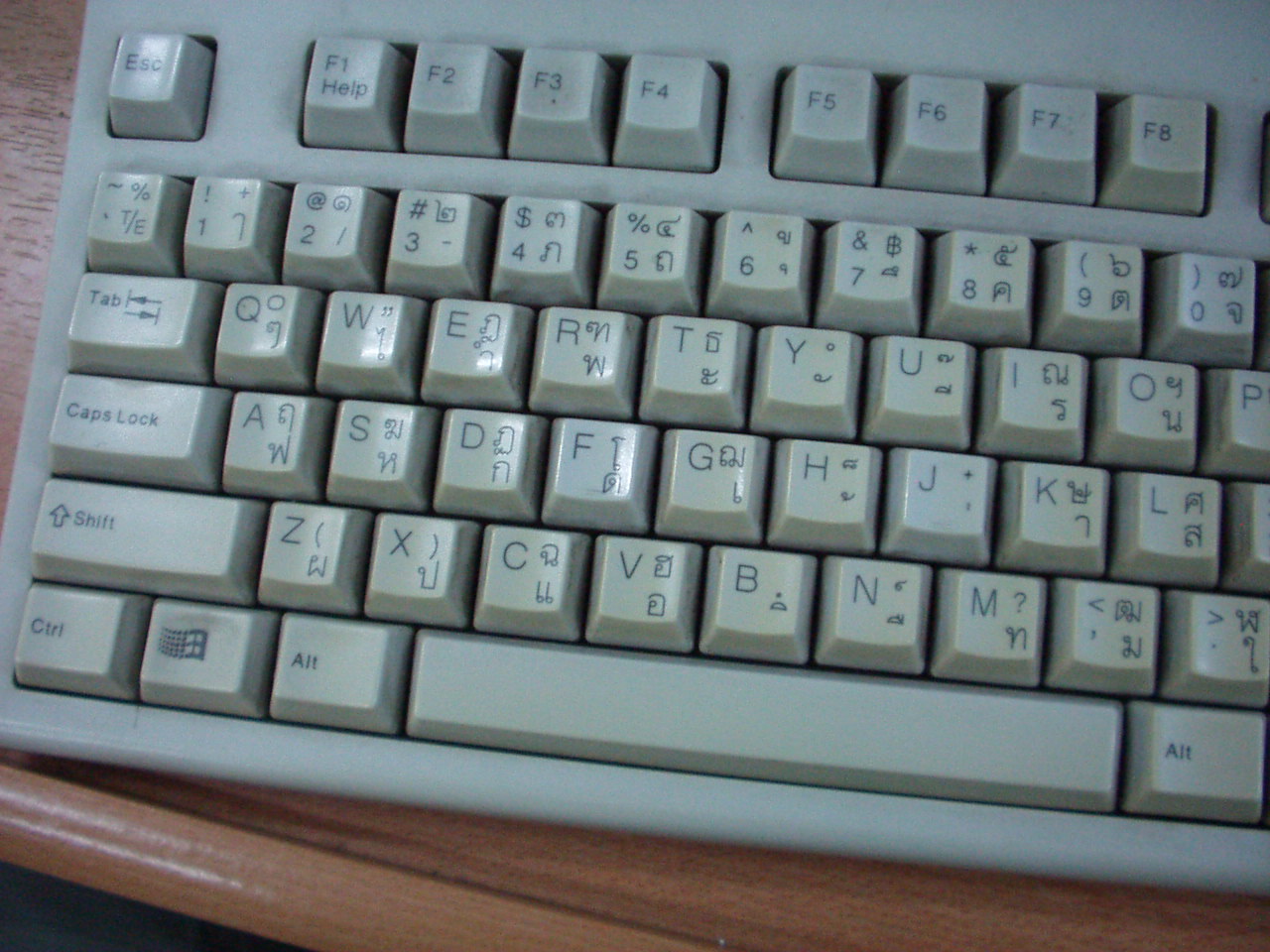
The home row: where the tone marks live
Rest your fingers on A–S–D–F and G–H–J–K–L and you are touching the most useful eleven characters in the language. Learn this row and nothing else and you can already spell a surprising number of words:
- A → ฟ (faw fan, f) · S → ห (haw hip, h) · D → ก (gaw gai, g) · F → ด (daw dek, d)
- G → เ (sara e) — the leading vowel, and the busiest key on the board
- H → ้ (mái thoo, tone mark two) · J → ่ (mái èek, tone mark one)
- K → า (sara aa, the long “ah”) · L → ส (sǎw sǔea, s)
- ; → ว (waw waen, w) · ' → ง (ngaw nguu, ng)
The two rarer tone marks hide on Shift of the same neighbourhood: Shift+J → ๋ (mái jàt-dtà-waa) and Shift+U → ๊ (mái dtrii). Shift+H gives ็ (mái tài-khúu), the little mark that shortens a vowel rather than changing its tone. If the difference between those four symbols is still fuzzy, our tone marks explainer lays out which mark produces which tone on which class of consonant.
Here is why this matters for politeness. A woman ending a sentence writes ค่ะ (khâ) for a statement and คะ (khá) for a question — and on the keyboard the only difference between them is whether you press J. Men have it easier with ครับ (khráp), which never changes shape. Thais notice the ค่ะ/คะ slip in chat messages the way an English reader notices your and you're, so it is worth getting that one keystroke right early.
Read Thai script in typing order: left to right, as you see it
Five Thai vowels are written before the consonant they are pronounced after: เ แ โ ใ ไ. Learners usually expect to have to type the consonant first and let the computer rearrange things. Thai does not work that way. You type strictly in visual order, left to right, exactly as the finished word looks on screen:
- ไทย (thai, “Thai”) — press W ไ, then M ท, then P ย. Three keys, in the order your eye reads them.
- เก่ง (gèng, “good at something”) — G เ, D ก, J ่, ' ง. The tone mark is typed after its consonant, because that is where it is stored even though it is printed above.
- The other leading vowels: C → แ, Shift+F → โ, . → ใ.
One more habit to build now: Thai does not put spaces between words. The space bar marks the end of a clause or a sentence, roughly where English would use a comma or a full stop. Typing ผม ชอบ อาหาร ไทย instead of ผมชอบอาหารไทย is the written equivalent of a heavy foreign accent, and it is the fastest way to be spotted as a beginner in a chat window.
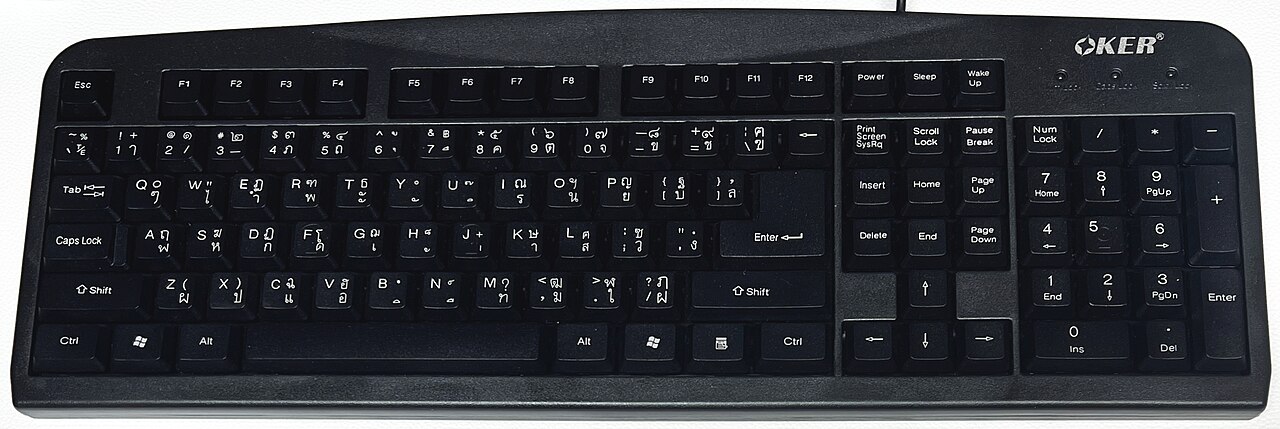
The number row holds letters, not numbers
This surprises everyone the first time. In Thai mode the top row gives you consonants and vowels — ๅ / - ภ ถ ุ ึ ค ต จ ข ช — and the digits you were expecting are on Shift:
- Shift+2 to Shift+5 → ๑ ๒ ๓ ๔ · Shift+8 to Shift+= → ๕ ๖ ๗ ๘ ๙ · Shift+Q → ๐
- Shift+7 → ฿, the baht sign — the one currency symbol worth memorising before you arrive
- Western digits come from the numeric keypad, or from flipping back to the English layout
Thai numerals turn up on temple plaques, licence plates, government forms and banknote serial numbers, so anyone learning to read Thai script in the wild should drill them, even though prices are usually written in Western digits. Our Thai numbers guide covers both sets side by side.
Two letters a typewriter quietly killed
The layout you are learning is older than the computer. In 1891 Edwin Hunter McFarland — a Bangkok-born American working as secretary to Prince Damrong — had a typewriter built for Thai in Syracuse, New York. He chose a Smith Premier because of its seven-row “double” keyboard: separate keys for upper and lower case and no shift mechanism at all, which meant roughly seventy-six keys to spend on Thai characters. He brought it to Siam in 1892 and presented it to King Chulalongkorn, who ordered seventeen more.
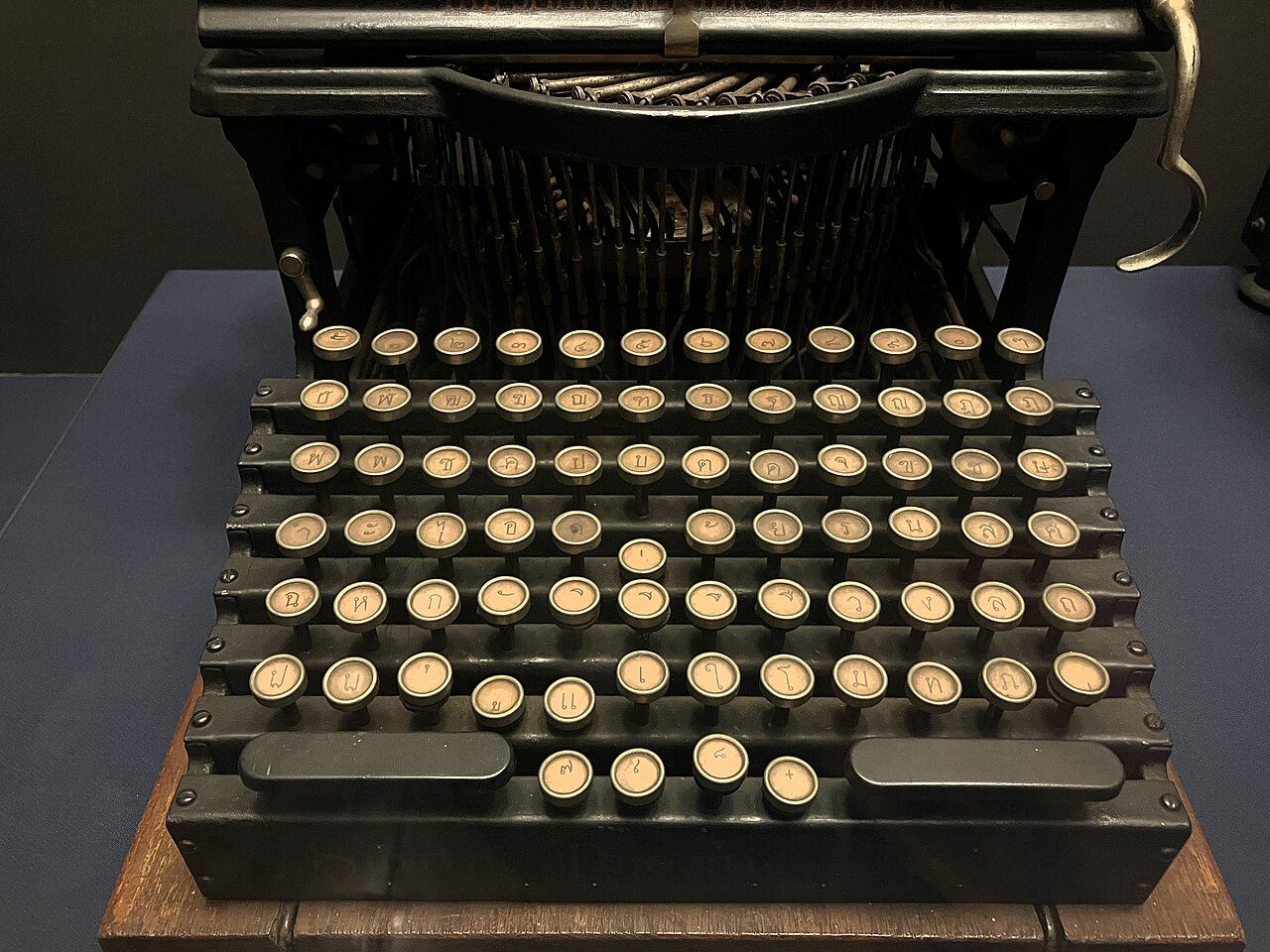
The two that did not make the cut were ฃ (khǎw khùat, “bottle”) and ฅ (khaw khon, “person”). They were already the least used of the forty-four, and being unprintable for a generation finished them off: both are now obsolete in ordinary writing, replaced by ข and ค. They still appear in every Thai alphabet chart and in the children's rhyme, which is why learners meet them and then never see them again — the story behind why Thai has 44 consonants for 21 sounds is half spelling history and half this typewriter.
They were eventually given a home on the computer layout: the backslash key, unshifted and shifted. It is the one key whose position wanders between keyboard models — a fitting address for two letters nobody types.
Kedmanee and the layout that tried to replace it
The arrangement on your keyboard is called Kedmanee (เกษมณี). It was released in 1931 and only acquired the name in about 1970, after Suwanprasert Ketmanee, its presumed designer. In 1965 an engineer at the Royal Irrigation Department, Sarit Pattachote, argued it was badly unbalanced — around seventy per cent of the work falling on the right hand — and published a redesign, Pattachote (ปัตตะโชติ), that tested about twenty-seven per cent faster. The government endorsed it, bought the machines and retrained civil servants. The private sector shrugged, and the effort was abandoned by 1973.
Kedmanee went on to become the national standard, TIS 820-2538, and is the default on Windows, macOS, Android and iOS. Pattachote is still shipped as an option on all of them, and almost nobody uses it. Learn Kedmanee.
Getting Thai onto your own machine
- Windows: add Thai under Language & region, then switch with Win + Space.
- macOS: add Thai under Keyboard → Input Sources, then switch with Ctrl + Space or the Globe key.
- Phones: add the Thai keyboard in your keyboard settings and swipe the space bar or tap the globe. Phone keyboards split Kedmanee across two screens — the second one is where the rare consonants and the numerals live.
- No Thai legends on your keys? A sheet of Thai letters stickers costs about fifty baht in any Thai computer shop, and covering them up again after a month is the best spelling drill there is.
A study tip: ten keys a week
Do not try to memorise the board. Take the home row first — eleven characters, one week — and type real words with them rather than drilling the keys in isolation: กา (gaa, crow), หก (hòk, six), เสา (sǎo, post), ว่าง (wâang, free). Week two, add the five leading vowels. Week three, the number row and the baht sign. By the end of the month you will have met about forty characters in the only way that sticks, which is by needing them.
Then pair it with recognition practice, because typing teaches your fingers faster than it teaches your eyes: run the same letters through our free flashcard trainer for ten minutes a day. Learning to type and learning to read Thai script reinforce each other in a way neither does alone — and the day you can thumb out ขอบคุณครับ without hunting for a single key is the day the script finally stops looking like decoration and starts looking like language.